
Latest Version
Update
December 11, 2025
December 11, 2025
Developer
PERSONA Watch Face
PERSONA Watch Face
Categories
Internet
Internet
Platforms
Android
Android
Downloads
0
0
License
$2.49
$2.49
Package Name
com.watchfacestudio.per017
com.watchfacestudio.per017
Report
Report a Problem
Report a Problem
More About PER017 Axis Digital Watch Face
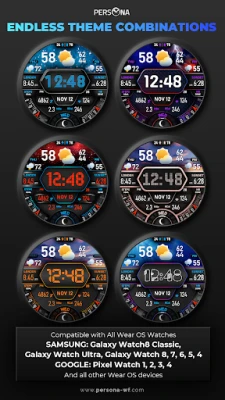
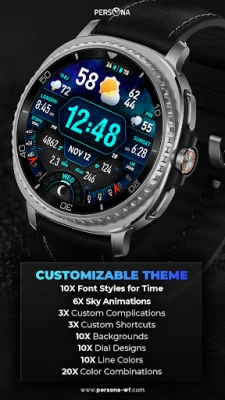
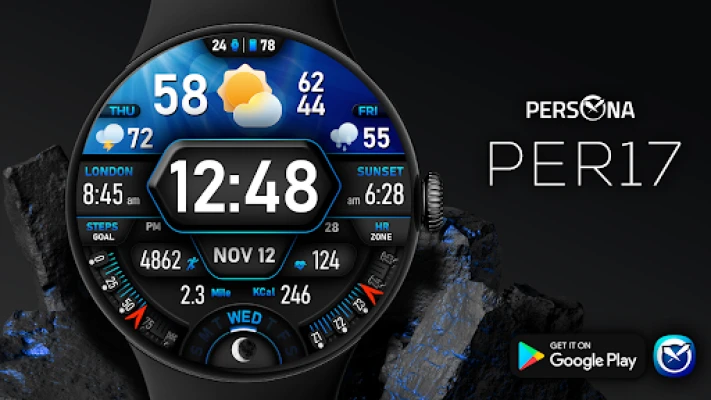
🚀PER17 Axis Digital Watch Face is an advanced digital watch face designed for Wear OS smartwatches. It offers changeable font styles, 3D realistic animated weather, stunning visuals, and forecast weather data.
🎨 Customization for PER17 Digital Watch Face
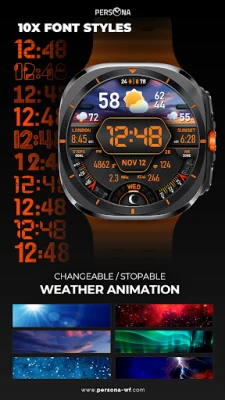
10 font styles
10 backgrounds
10 line colors
10 dial designs
6 sky animations
20 color combinations
10 AOD dims
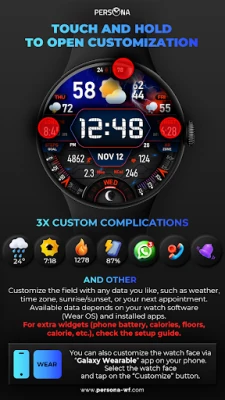
3 custom complications
3 custom app shortcuts
🔹 Features of PER17 Digital Watch Face
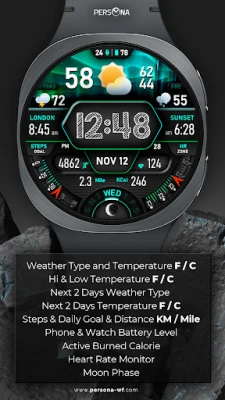
Weather type and temperature (°F / °C)
High & Low temperature (°F / °C)
Next 2 days' weather type
Next 2 days' temperature (°F / °C)
Steps, daily goal & distance (KM / Miles)
Phone & watch battery level
Active burned calories, floors
Heart rate monitor
Moon phase, UV index, rain possibility
Time zone, sunset/sunrise, barometer
Next appointment reminder
Always-On display with adjustable colors
🛠️ Easy Customization Mode
Simply touch and hold to personalize what data you see — weather, sunrise/sunset, time zone, and more.
🔋 For extra complications and widgets like phone battery, calories, or floors, please check the setup guide here:
👉 https://persona-wf.com/installation/
❓ Weather Not Updating?
Seeing a “❓” icon? That means your watch can’t get weather data. Check your internet connection and refresh the watch face.
🌙 Always-On Display (AOD)
The watch face has an always-active display. You can change the brightness level in the customization menu. There are 10 levels in total.
The colors are synchronized with the normal view.
With the new option “AOD Dim” in the customization menu, you can now change the AOD layout.
🌐 More Details & Features
https://persona-wf.com/portfolios/axis/
📖 Installation Guide
Before leaving a review, make sure to check the installation guide and FAQ for a smooth experience:
👉 https://persona-wf.com/installation/
⌚ Supported Devices
Compatible with all Wear OS devices (API Level 34+), including:
SAMSUNG: Galaxy Watch8 Classic, Galaxy Watch Ultra, Watch8, 7, 6, 5, 4
GOOGLE: Pixel Watch 1, 2, 3, 4
FOSSIL: Gen 7, Gen 6, Gen 5e series
MOBVOI: TicWatch Pro 5, Pro 3, E3, C2
🚀 Exceptional Support
Need assistance? We’re here for you
📩 [email protected]
💜 Join Our Community
Stay updated with new designs & offers
🌐 https://persona-wf.com
📩 Newsletter
https://persona-wf.com/register
👍 Facebook
https://www.facebook.com/Persona-Watch-Face
📸 Instagram
https://www.instagram.com/persona_watch_face
💬 Telegram
https://t.me/persona_watchface
▶️ YouTube
https://www.youtube.com/c/PersonaWatchFace
💖💖💖 Thank You for Choosing PERSONA!
We hope our design brightens your day and your wrist. 😊
Designed with love by Ayla GOKMEN
10 font styles
10 backgrounds
10 line colors
10 dial designs
6 sky animations
20 color combinations
10 AOD dims
3 custom complications
3 custom app shortcuts
🔹 Features of PER17 Digital Watch Face
Weather type and temperature (°F / °C)
High & Low temperature (°F / °C)
Next 2 days' weather type
Next 2 days' temperature (°F / °C)
Steps, daily goal & distance (KM / Miles)
Phone & watch battery level
Active burned calories, floors
Heart rate monitor
Moon phase, UV index, rain possibility
Time zone, sunset/sunrise, barometer
Next appointment reminder
Always-On display with adjustable colors
🛠️ Easy Customization Mode
Simply touch and hold to personalize what data you see — weather, sunrise/sunset, time zone, and more.
🔋 For extra complications and widgets like phone battery, calories, or floors, please check the setup guide here:
👉 https://persona-wf.com/installation/
❓ Weather Not Updating?
Seeing a “❓” icon? That means your watch can’t get weather data. Check your internet connection and refresh the watch face.
🌙 Always-On Display (AOD)
The watch face has an always-active display. You can change the brightness level in the customization menu. There are 10 levels in total.
The colors are synchronized with the normal view.
With the new option “AOD Dim” in the customization menu, you can now change the AOD layout.
🌐 More Details & Features
https://persona-wf.com/portfolios/axis/
📖 Installation Guide
Before leaving a review, make sure to check the installation guide and FAQ for a smooth experience:
👉 https://persona-wf.com/installation/
⌚ Supported Devices
Compatible with all Wear OS devices (API Level 34+), including:
SAMSUNG: Galaxy Watch8 Classic, Galaxy Watch Ultra, Watch8, 7, 6, 5, 4
GOOGLE: Pixel Watch 1, 2, 3, 4
FOSSIL: Gen 7, Gen 6, Gen 5e series
MOBVOI: TicWatch Pro 5, Pro 3, E3, C2
🚀 Exceptional Support
Need assistance? We’re here for you
📩 [email protected]
💜 Join Our Community
Stay updated with new designs & offers
🌐 https://persona-wf.com
📩 Newsletter
https://persona-wf.com/register
https://www.facebook.com/Persona-Watch-Face
https://www.instagram.com/persona_watch_face
💬 Telegram
https://t.me/persona_watchface
▶️ YouTube
https://www.youtube.com/c/PersonaWatchFace
💖💖💖 Thank You for Choosing PERSONA!
We hope our design brightens your day and your wrist. 😊
Designed with love by Ayla GOKMEN
Rate the App
Add Comment & Review
User Reviews
Based on 0 reviews
No reviews added yet.
Comments will not be approved to be posted if they are SPAM, abusive, off-topic, use profanity, contain a personal attack, or promote hate of any kind.













More »

Popular Apps

5 Calls: Contact Your Congress5 Calls

Shorts AI - Video Creator AppWild Media AI

Consider It Y•A•VBranded MINDBODY Apps

SalesforceSalesforce.com, inc.

Found It! Hidden Object GameLion Studios Plus

Ultimate Myth: Idle RPGLoongcheer Game

Chair Yoga for Seniors-EasyFIT7M Limited

RichpanelRichpanel

Breast Cancer AwarenessRouh Matrouh

Living As Awareness w/ Deana CBreakthrough Apps Inc
More »
Editor's Choice

StarbucksStarbucks Coffee Company

easypaisa – a digital bankTelenor Microfinance Bank Limited

CoComelon: Learn ABCs and 123sMoonbug Entertainment Limited

Retain by Total CSRTotalCSR

Monthly Entertainment608factory
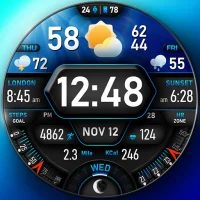
PER017 Axis Digital Watch FacePERSONA Watch Face

ISB BrusselsFinalsite

CLEAR - Travel & ExperiencesAlclear LLC

Audible: Audio EntertainmentAudible, Inc.

Marie Claire ItaliaHearst Magazines Italia Spa